
The two models in one paragraph each
Nano Banana is the name of Google's Gemini image models. In Doppelshot, it comes in two versions: Nano Banana 2.1 for fast standard runs and Nano Banana Pro for sharper, larger images that go up to 4K. Both are native Gemini image models that read your photo and your words together. Instead of drawing a face from scratch, the model edits your selfie in place, keeping the same face while placing you into a new scene. Because it is strong on realism and keeping a real person recognizable, Nano Banana 2.1 is the default engine for most photo cards, including the free preview.
GPT Image 2.5 is OpenAI's image model, the same technology behind images in ChatGPT. Doppelshot runs its two flavours, Flare and Sunburst, as photo engines across the app. Where Nano Banana focuses on fast, direct realism, GPT Image 2.5 is built for rich, busy scenes and non-photographic styles like oil on canvas, film stills, renaissance portraits and vintage prints. It follows long, structured prompts well when you specify the scene, outfit, light, mood and constraints in order, and it writes short text cleanly inside the picture. You can compare both alongside the rest of the catalog on the all AI models page.
Likeness: who keeps your face
When you search for the best AI model for selfies, the main question is whether the output actually looks like you. A picture with great lighting is useless if the person in the frame looks like a stranger. Both engines solve this, but they take different paths and excel in different situations.
Nano Banana 2.1 and Nano Banana Pro edit your uploaded photo in place. Every photo card in Doppelshot adds an identity instruction to the run, and because Nano Banana reads your image and your prompt at the same time, it preserves specific expressions. If you ask for yourself as an astronaut with the same smile, it keeps that exact smile. This in-place editing also makes Nano Banana the stronger choice for couple and group photos. When more than one person is in the frame, the system assigns one identity block per person, and Nano Banana keeps every face recognizable.
GPT Image 2.5 also keeps your face from a single selfie, especially when translating your features into an artistic medium. If you want to see yourself painted by an old master or shot on 1970s film, GPT Image adapts your facial structure into brushstrokes or film grain without losing who you are. In addition, if you build a learned face profile from 10 to 20 selfies using an AI twin, Doppelshot can render your twin photos through Phota using GPT Image.
For a straightforward test, imagine running the exact same prompt on both engines: a portrait of you at a cafe table at dusk, wearing a dark coat, with warm lamps behind you. Nano Banana 2.1 will give you a crisp, realistic photograph where your face, skin and expression stay very close to your original selfie. GPT Image 2.5 will follow the scene, outfit, light and mood rules closely, giving the cafe a stylized, cinematic or painterly atmosphere while fitting your features into that mood.
Text, posters and logos
Generating readable words inside an image has historically been a weak spot for AI photo generators. If your scene includes a book cover, a street sign or a poster title, your choice between Nano Banana 2.1 vs GPT Image 2.5 matters right away.
Standard Nano Banana 2.1 is built for speed and portrait realism, not typography. If you need text inside a Nano Banana photo, you have to step up to Nano Banana Pro. Pro renders finer detail and handles text in the picture, making it suitable when a sign or label needs to hold up on closer inspection.
GPT Image 2.5 handles short text cleanly on its standard run. Because it writes readable lettering without needing a higher tier, it works well when you want a short phrase, a cover title or a vintage label integrated directly into a stylized scene.
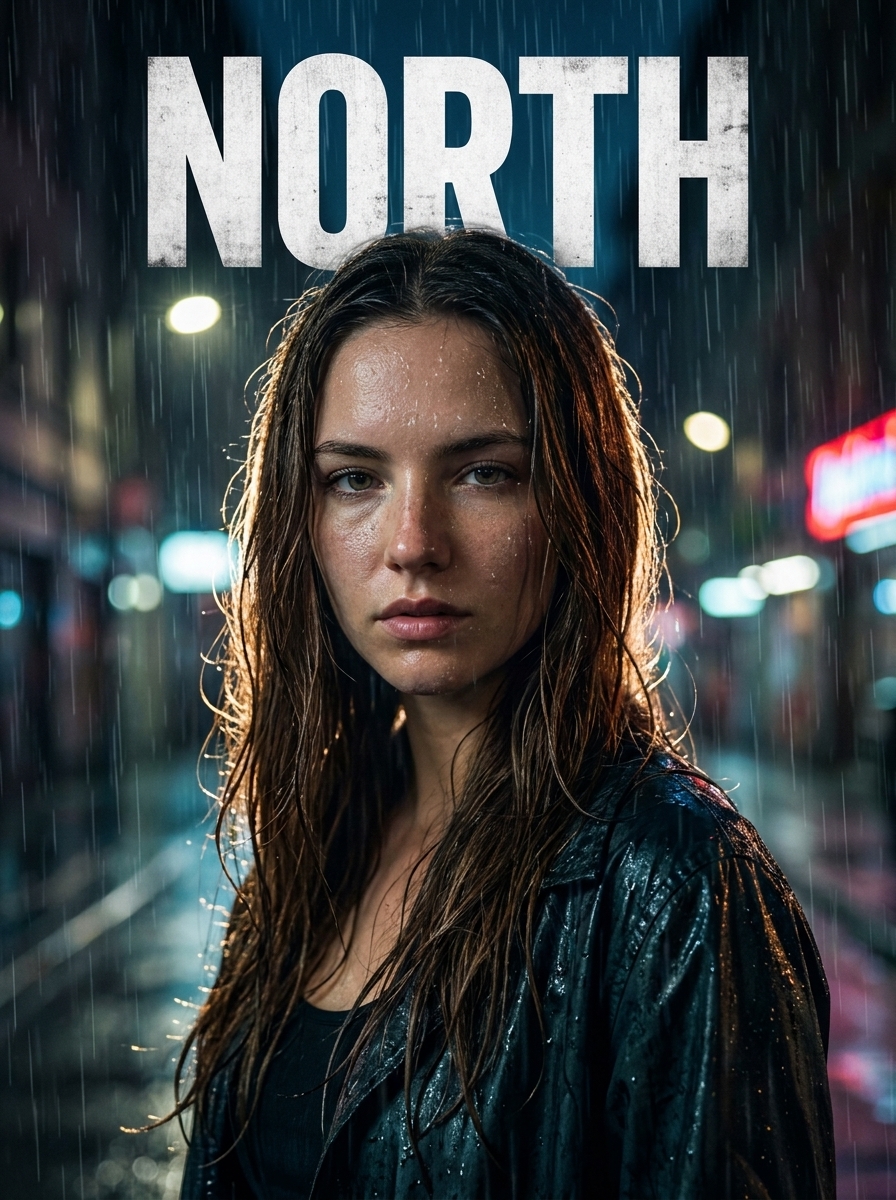
For dedicated poster layouts, Doppelshot also uses a third specialist. The movie poster card, which puts you as the star with your title in big letters, runs by default on Ideogram 4.5. And if you are making business product shots where your own product needs an exact print and logo, the business tools handle up to three products per photo. Still, for everyday scenes under your own prompt that happen to include a few written words, GPT Image 2.5 and Nano Banana Pro are the two engines to pick between.
Skin, light and the studio look
The texture of skin, the way light falls on a jacket and the behavior of hands or background props separate a clean portrait from an obvious AI picture.
Nano Banana 2.1 is tuned for photographic realism. On the studio headshot card, which makes a clean professional portrait for LinkedIn and your CV, Nano Banana produces natural skin textures and clean studio lighting straight from one selfie. If you notice that a first result on 2.1 lost a small detail you care about, such as the texture of a frame, a piece of jewelry or the way hands sit in a pose, switching to Nano Banana Pro renders more detail across the whole image.

GPT Image 2.5 shines when the light and texture are meant to look like another medium rather than a modern digital camera. It is the default engine for the renaissance portrait card (oil on canvas, painted by an old master) and the vintage film card (Kodak 1970s look, sun flare, soft grain). When a prompt has many moving parts, such as specific clothing, directional light, a distinct mood and strict scene constraints, GPT Image follows that structure step by step. For a plain realistic photo, Nano Banana is just as faithful to your face, while GPT Image is the better pick when the surface itself should look like canvas, paper or analog film.
Speed and resolution
When you compare Nano Banana vs GPT Image for everyday use, speed and output size often decide which one you click.
Nano Banana 2.1 is the fast tier. A photo is ready in about 20 seconds. Every photo card lets you pick between four aspect ratios (9:16, 3:4, 1:1 or 16:9) without changing the cost. On Nano Banana cards, you can also choose the output quality: 1K, 2K or 4K. That makes it easy to test an idea at standard 1K resolution and then run a 2K or 4K version with Nano Banana Pro when you want a large file or a print.
GPT Image 2.5 takes a bit longer than Nano Banana 2.1 when rendering complex scenes and stylized textures, though it operates in the same single-selfie workflow with the same 9:16, 3:4, 1:1 and 16:9 format options. If you generate a GPT Image result and decide you want to frame it on a wall, you can run the built-in upscaler afterward to multiply the pixels by 2x, 3x or 4x for A4, A3 or A2 prints.
In both cases, there is no guessing about what a run will cost when you change engines or resolution tiers. In the Studio, the price shows before you run.
Which one for which card
Most people do not want to memorize model specs before making a picture. That is why every card in Doppelshot picks a default model that fits the job, while the Studio lets you switch to another engine with one click. You can read more about how the catalog is wired in our guide on which AI models Doppelshot uses.
Here is the practical breakdown for choosing between Nano Banana and GPT Image across the cards:
- Studio headshot, Anime and Astronaut: Keep the default, Nano Banana 2.1. It is fast, keeps your face and expression intact, and is eligible for the free preview at signup.
- Renaissance portrait and Vintage film: Keep the default, GPT Image 2.5. Its Flare and Sunburst flavours are built for oil paint textures, 1970s Kodak grain and warm sun flare.
- Couple and group photos: Use Nano Banana 2.1 or Nano Banana Pro. They handle one identity block per person cleanly so every person in the photo stays recognizable.
- Packs of 10 photos (couples polaroid, music video): These run on Nano Banana Pro for consistent detail across the set.
- Your own prompt: Start with Nano Banana 2.1 if you want a realistic photo of yourself in a new place. Switch the chip in the Studio to GPT Image 2.5 if your prompt is long and structured, has a busy scene with many elements, asks for an illustration or painting style, or includes short text that needs to be readable. Step up to Nano Banana Pro if you need 4K resolution or sharper fine details.
Whenever you switch the engine or the quality tier in the Studio, the price shows before you run, and if a generation ever fails, it is redone for free or the credits are returned.
FAQ
Which is the best AI model for selfies, Nano Banana 2.1 or GPT Image 2.5?
For a realistic photo that looks like a camera took it, Nano Banana 2.1 is the better choice. It edits your selfie in place in about 20 seconds and keeps your face and expression accurate. For artistic styles like oil paintings, 1970s film looks, or busy scenes with a long prompt and short text, pick GPT Image 2.5.
When should I switch from Nano Banana 2.1 to Nano Banana Pro?
Start with Nano Banana 2.1 for fast everyday photos. Switch to Nano Banana Pro when you want 2K or 4K resolution for printing, when your picture includes text, or when a first result on 2.1 missed a small detail you care about.
Do I need to upload 10 to 20 photos to use these models?
No. Both Nano Banana 2.1 and GPT Image 2.5 work from one clear selfie on all standard photo cards, with no training wait. You only upload 10 to 20 selfies if you choose to create an optional AI twin for reusable character sets or twin packs.
Are my selfies used to train Google or OpenAI models?
No. Your uploaded selfies live in a private bucket with no public link. AI providers receive the selfie only to produce your generation through a short-lived signed link, and your photos are never used to train Doppelshot's or the providers' models. You can delete your selfies and your account at any time from the app.